Meet MapLedger: The GL Mapping Solution Built for Trucking Companies
Summary: MapLedger is a purpose-built GL mapping and activity-based costing (ABC) solution designed specifically for trucking companies. It brings clarity to complex financial data by standardizing accounts, helping carriers uncover true load-level profitability and make more confident, data-driven decisions.
There is a problem that sits at the foundation of trucking financial management, and almost nobody talks about it directly. It’s not a rate problem. It’s not a driver problem. It’s not even a market problem. It’s a data structure problem, and it has been quietly disrupting the financial analysis of trucking companies for decades.
The problem is this: Every carrier’s general ledger is different. Not slightly different. Fundamentally, structurally, architecturally different. One company calls it “Driver Pay – OTR Company.” Another calls it “4100 – Wage Expense – Line.” A third uses an accounting system default that was set up decades ago (e.g., the ICC Chart of Accounts) and never revisited.
All three are recording the same economic event. None of them can be compared to each other, or to benchmarks, or to their own prior periods, without significant manual translation work.
MapLedger was built to end that process. And it was built around a specific objective: Be the most precise Activity-Based Costing (ABC) model in trucking. The goal of every design decision in MapLedger, from the three-tier mapping engine to the dynamic distribution framework, is to match every dollar of cost to the activity that actually caused it as precisely as the underlying data allows.

From GL Data to Load-Level Profitability
The MapLedger pipeline is built around a single idea: Every dollar of cost that enters your general ledger should be traceable to every load it touched.
Getting Data In: Every Source, One Pipeline
MapLedger accepts GL data from wherever it lives. For carriers who export trial balances manually, CSV and Excel file upload is supported, including multi-sheet workbooks and full period history. For carriers running McLeod Software, a direct TMS integration automates the GL export entirely.
For those on QuickBooks, Sage, Xero, or other ERP and accounting platforms, API integrations bring data in on a scheduled or real-time basis. The source does not matter. Once data enters MapLedger, it enters the same standardized pipeline.
| Manual Upload | McLeod TMS | QuickBooks | Sage / Xero |
|
|
|
|
Your native chart of accounts is never modified. MapLedger maintains it in full while building the standardized overlay that powers analytics. You operate both in parallel: Your books stay exactly as they are, and your analytics speak a common language.
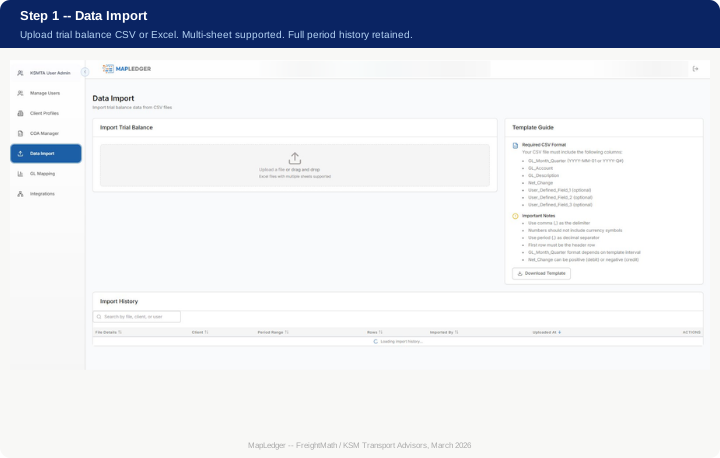
Step 1 – Data Import
The Data Import screen is the entry point for every period’s financial data. Upload a trial balance CSV or Excel file, and MapLedger parses it, validates the format, and loads it into the import history with full metadata: file details, period range, row count, and upload timestamp. Every import is traceable and auditable.
The platform requires a structured format – GL account, description, period, and net change – but supports the user-defined fields that carriers often need to carry additional classification or cost center data through the mapping process. A downloadable template ensures any source system can produce a compatible export.
Step 2 – GL Mapping
GL Mapping is where the translation happens. Every native GL account is assigned to a corresponding account in the FreightMath Standard Chart of Accounts using one of three mapping types, each designed for a different level of cost precision.
Direct (1:1)
The most straightforward mapping type. The full balance of a native GL account flows directly to a single standard account, unchanged. This is the correct approach for accounts where the native description already maps cleanly to a standard category, driver wages to Driver Wages – Company Driver – OTR, fuel purchases to Fuel Expense – Company Driver – OTR, and so on. Direct mappings are fast to configure and easy to audit.
Percentage
Where a single native account needs to be split across multiple standard accounts, Percentage mapping applies a set of static, user-defined percentage weights. A combined insurance account might be split 60% to Liability Insurance and 40% to Physical Damage Insurance. These splits are configured once and applied consistently period over period, making them appropriate where the underlying cost mix is stable and well-understood.
Dynamic
Dynamic mapping is the most analytically powerful of the three types, and the one that most directly reflects MapLedger’s Activity-Based Costing objective. Rather than applying a fixed percentage split, Dynamic mapping uses the actual relationships between accounts and operational statistics for the same period to determine how costs should be allocated.
A fuel account shared across multiple operating divisions, for example, would be split in proportion to the actual loaded miles run by each division in that period, not a predetermined ratio, but the real activity that drove the cost.
This is the key distinction between Dynamic mapping and conventional GL transformation processes.
Static splits assume the cost relationship is constant. Dynamic mapping recognizes that the relationship changes every period as operational mix shifts and adjusts the allocation accordingly. The result is a more accurate representation of what each division, operation, or cost center actually costs to run, grounded in the same period’s financial and statistical data.
Each mapping carries a polarity flag ensuring revenue and expense accounts flow correctly into the operating ratio regardless of how the source system records them. Confidence scoring highlights accounts that may need analyst review. Mappings can be applied to a single period or pushed forward to all future periods in a single action.
The header of the mapping screen shows the results in real time: mapped account count, unmapped balance, and the operating ratio calculated three ways simultaneously – Raw with no exclusions, Raw with exclusions applied, and Adjusted based on active rules. When every account is mapped and the unmapped balance is zero, the data is ready to distribute.
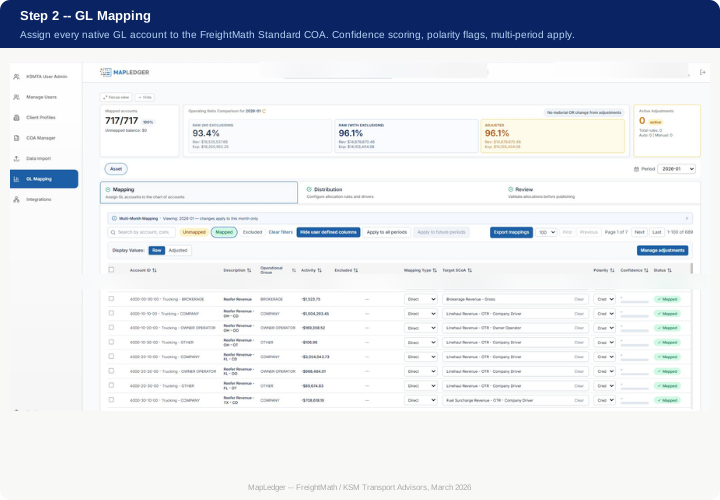
The standard COA is organized around how trucking companies actually operate. Revenue covers Linehaul, Fuel Surcharge, and Accessorials. Direct costs cover Driver Compensation, Fuel, Equipment Expense, and Maintenance. Network costs capture brokered capacity and third-party services. Overhead handles G&A, IT, facilities, and non-operational insurance. Alongside the financial accounts, statistical accounts – miles, loads, assets, headcount – travel through the mapping to power ratios, allocations, and KPI consistency across the platform.
Step 3 – Distribution
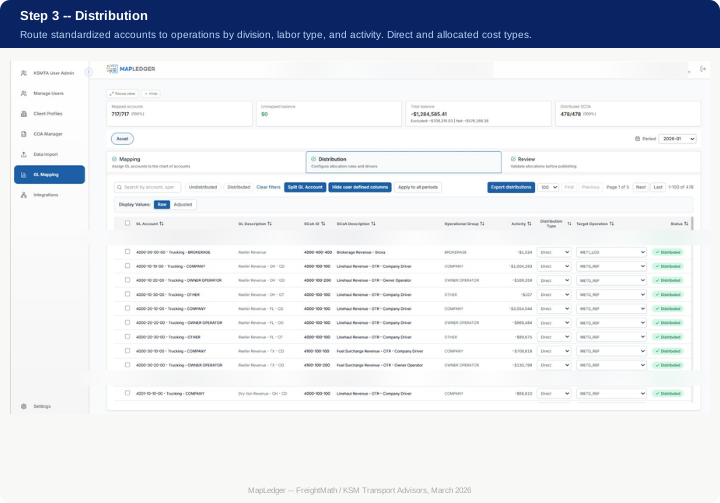
If GL Mapping is about standardizing what costs are, Distribution is about determining where they belong. This is where the Activity-Based Costing framework moves from concept to execution and where every standardized account is assigned to a specific asset or non-asset operation, using the most precise causal relationship available for that period.
The core question Distribution answers is: Which operation actually caused this cost? Not which operation should theoretically bear it, or which split was agreed upon last year, but which operation, based on the actual financial and operational data from this period, is the correct recipient.
Variable costs like fuel and driver wages follow actual loaded and empty miles. Overhead follows loads, empty miles, and dwell hours in proportion to how each operation actually used fleet resources. Pre-standard costs (driver settlements, direct charges, equipment costs) are allocated directly to the loads they belong to, with no statistical spreading required.
For more complex allocations, Distribution uses FreightMath operational measures as drivers. Miles per operation, loads per operation, asset utilization, revenue per operation. These are not estimates or proxies. They are the actual period measures flowing through the same system, applied as allocation drivers to achieve the most defensible match between activity and expense that a GL-based system can produce.
The result is a distribution of costs across operations that reflects what actually happened in that period. Not a budgeted split, not a prior-year ratio, not a management judgment call. When 478 of 478 SCoA accounts are distributed and the total balance reconciles to zero variance, the period’s cost structure is ready for analysis.
Step 4 – Review and Publish: FP&A for the Trucking Operation
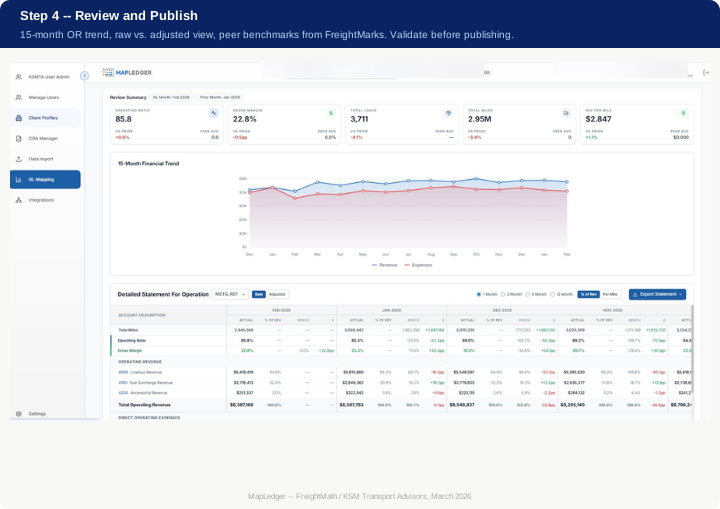
The Review module is not a summary screen. It is a functional Financial Planning and Analysis (FP&A) environment. It’s the place where a carrier’s finance team validates, interprets, and acts on the period’s standardized financial data before it is published downstream in FreightMath™ and BidRight platforms.
The Review Summary surfaces the five metrics that define a period: operating ratio, gross margin, total loads, total miles, and revenue per mile. Each is shown with comparison to the prior period and to the peer average from FreightMarks™. The 16-month financial trend chart plots revenue and expenses across the trailing 15 months, making it immediately visible whether a margin compression is a seasonal pattern or a structural shift.
The detailed, standardized section provides a full line-by-line P&L for any operation in the carrier’s structure, selectable from the dropdown. Both raw and adjusted views are available. Reporting intervals span 1-month, 3-month, 6-month, and 12-month periods. Every line item is presented two ways simultaneously: as a percentage of revenue and as a cost per mile.
Benchmark columns show the variance against the FreightMarks peer group on both dimensions so a carrier can see at a glance not just how they performed, but how that performance compares to carriers of similar size and operating model.
This dual-dimension benchmarking – percentage of revenue and per mile – is a deliberate design choice. Benchmarking as a percentage of revenue tells you how efficiently you convert revenue to profit. Per-mile benchmarking tells you whether your cost structure is competitive in the market.
Both matter, and they do not always tell the same story. A carrier with a strong OR can still be uncompetitive on per-mile costs if they are running unusually short hauls. The Review module surfaces that distinction explicitly.
Looking ahead, Review will expand into active forecasting functions, allowing finance teams to project forward from current period actuals using operational assumptions, model the OR impact of cost changes, and stress-test the financial plan against different volume and rate scenarios. The infrastructure for that capability is already built into the period data model. The tools to act on it are coming.
When the numbers are validated and the period is clean, you publish. From that point, the data flows into FreightMath for load-level pricing, into FreightMarks for industry benchmarking, and into BidRight for bid analysis and rate validation.
Free Tool: Build Your GL Before You Map It
One of the most common barriers to implementing a standardized chart of accounts is the blank-page problem. Where do you start? How should accounts be structured? What codes should you assign?
To remove that barrier entirely, the FreightMath GL Builder is available now as a free tool. No subscription, no commitment required.
Try the FreightMath GL Builder
The GL Builder walks through the MapLedger account structure in three steps.
- Define your Operational Groups: your divisions or business lines, each with a numeric code
- Select your Labor Groups: Company Driver, Owner Operator, Lease Purchase
- Provide basic company information and generate
The tool outputs a complete, MapLedger-ready GL in both CSV and Excel format, pre-structured to your operational configuration, ready to implement in your accounting system or import directly into MapLedger.
Common operational group patterns used by carriers going through this process: OTR (100), Dedicated (200), Local / Shuttle (300), Brokerage (400, flagged Non-Asset). Equipment-specific programs like Reefer Fleet (110) or Flatbed Fleet (120). Customer-facing dedicated programs with their own code for clean customer P&L isolation.
The GL Builder output matches the FreightMath Standard COA exactly. Whether you use it to set up a new accounting file, structure a TMS export, or prepare for a MapLedger implementation, the account numbers will align with the platform from day one.
The Operating Ratio Is a Conclusion, Not a Starting Point
The operating ratio is the number everyone in this industry talks about. But an operating ratio is only as meaningful as the data structure behind it. A 93% OR calculated on a GL where driver wages and owner-operator settlements are commingled, where fuel surcharge is netted against fuel expense, where G&A is spread across divisions without any allocation logic, that number is an artifact of accounting convenience, not a reflection of operational reality.
MapLedger was built on a specific belief: The financial data trucking companies already produce contains everything needed for rigorous, granular, period-over-period performance analysis. It just needs to be properly structured, and it needs to be structured in a way that reflects actual cost causation, not convention, not budget assumptions, not static splits that were set up once and never revisited.
That is what Activity-Based Costing means in practice for a trucking operation. It means when you run a dedicated division alongside an OTR fleet, the costs allocated to each reflect what those operations actually consumed in that period, not what the budget said they should. It means when you have a carrier running 85% loaded miles and 15% empty, the variable cost pool follows that reality rather than a rule of thumb. It means when your operational mix shifts quarter over quarter, your cost allocations shift with it automatically.
If you want to know whether your dedicated division is performing at a different OR than your OTR fleet, MapLedger gives you that answer with full traceability.
If you want to know whether your per-mile driver cost has moved relative to a peer group of carriers your size, FreightMarks gives you that comparison because MapLedger structured your data the same way everyone else’s is structured. And if you want to model the financial impact of a rate change, a cost reduction, or an operational shift before you commit to it, that capability is coming in the forecasting layer of the Review module.
Get Started With MapLedger
| Free GL Builder | MapLedger Implementation |
| Build your MapLedger-ready chart of accounts in minutes. Free, no login required. | From raw trial balance to live operating ratio with full divisional visibility. Typically completed in a single working day for carriers under 800 accounts. |
For more information, please contact a KSMTA advisor via the form below.
Related Content
Where Ownership
Meets Opportunity
At KSM, you’re more than an employee, you’re a firm owner.